
RouteForge
RouteForge is a powerful tool for automating route generation and management in your application. It simplifies the process of defining and configuring routes, making it easier to maintain and scale your routing system.
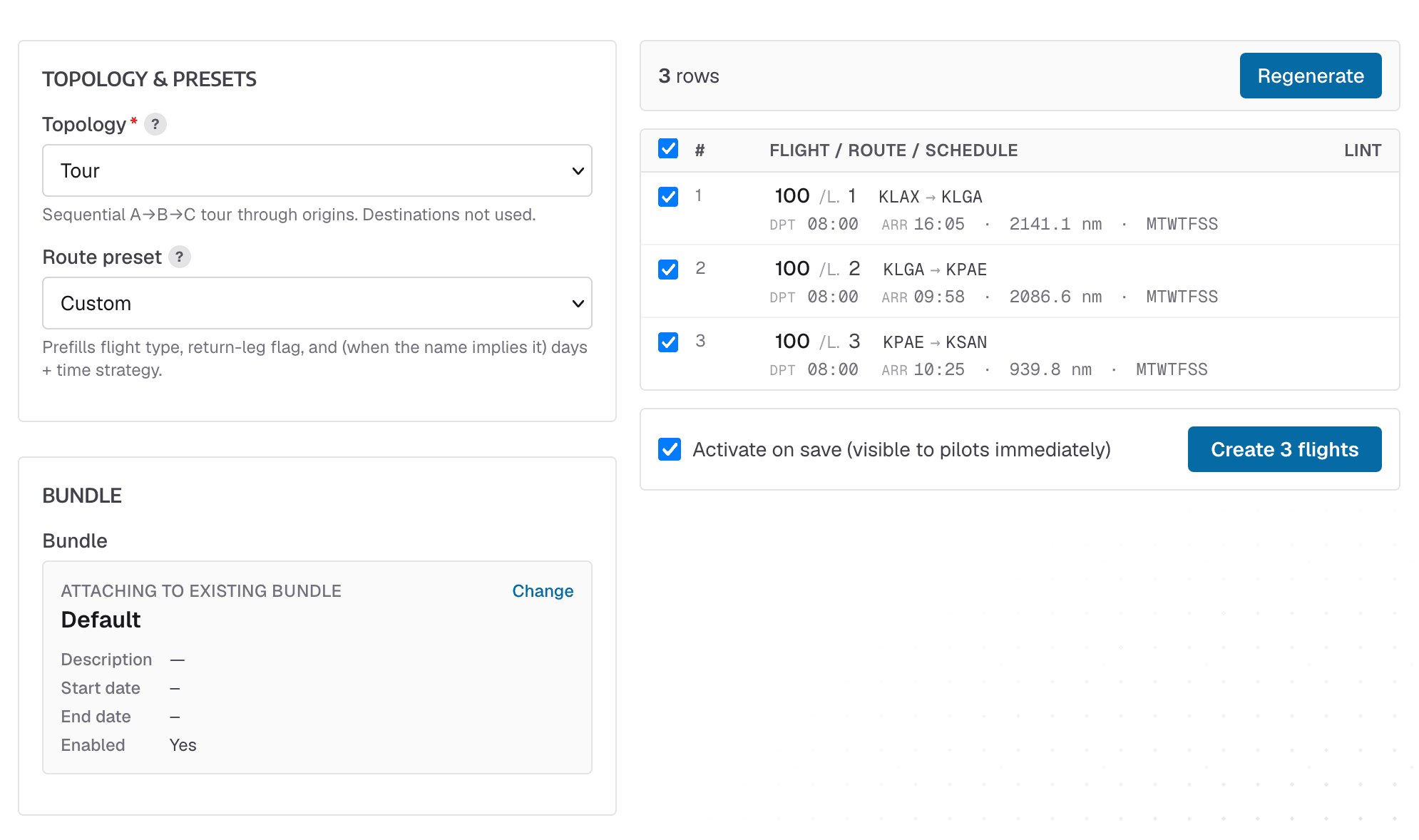
Topologies
The first thing to select is the topology of the flights. This drives how the flight combinations are generated.
- Hub → Spokes One origin, many destinations. One leg per destination.
- Spokes → Hub Many origins, one destination. One leg per origin.
- Hub & Spokes (auto returns) One origin, many destinations, with automatic return legs.
- Mesh Every origin to every destination, no returns.
- Tour Sequential A→B→C tour through origins. Destinations not used.
Route Presets
Some presets are included that configure the dates and times according to some common scenarioes.
- Regional Spoke Short out-and-back sectors. Scheduled passenger with auto return legs.
- Long-haul Daily Long sectors flown every day. Scheduled passenger with auto return legs, all 7 days, fixed 08 departure.
- Weekend Leisure Routes for Sat/Sun only. Scheduled passenger with auto return legs, weekends, 10 spread.
- Cargo night Overnight ops for the freight dogs. Cargo flight type, no return legs, redeye window starting 22
- Training routes Currency and training flights. Training flight type, no return legs.
- Positioning Empty repositioning legs. Positioning flight type, no return legs.
Bundles
Choose or create a new bundle for these flights to be included in. You can create a new bundle, e.g, "Summer 2026 Routes", with active dates, and all the flights generated will be part of that bundle, which you can then enable/disable/delete as one unit
Airlines and Subfleets
All flights are assigned to the airline and subfleet you select. If your subfleet has flight types restricted on it, only those subfleets will be shown when you select the flight type
Airports
Airport selection is pretty straight forward, see the Topologies above. The only items of note are:
Mesh
Every airport you select as the origins and arrivals, flights will be created between all of them. This can create a lot of flights
Tour
Only origin airports are used for this topology; choose the airports in the order that you want the tour.
When you select "Tour", the Flight Numbering scheme is automatically set to "Same flight number, incrementing legs" - So you can do Flight 100, Leg 1, 2, 3, etc.